
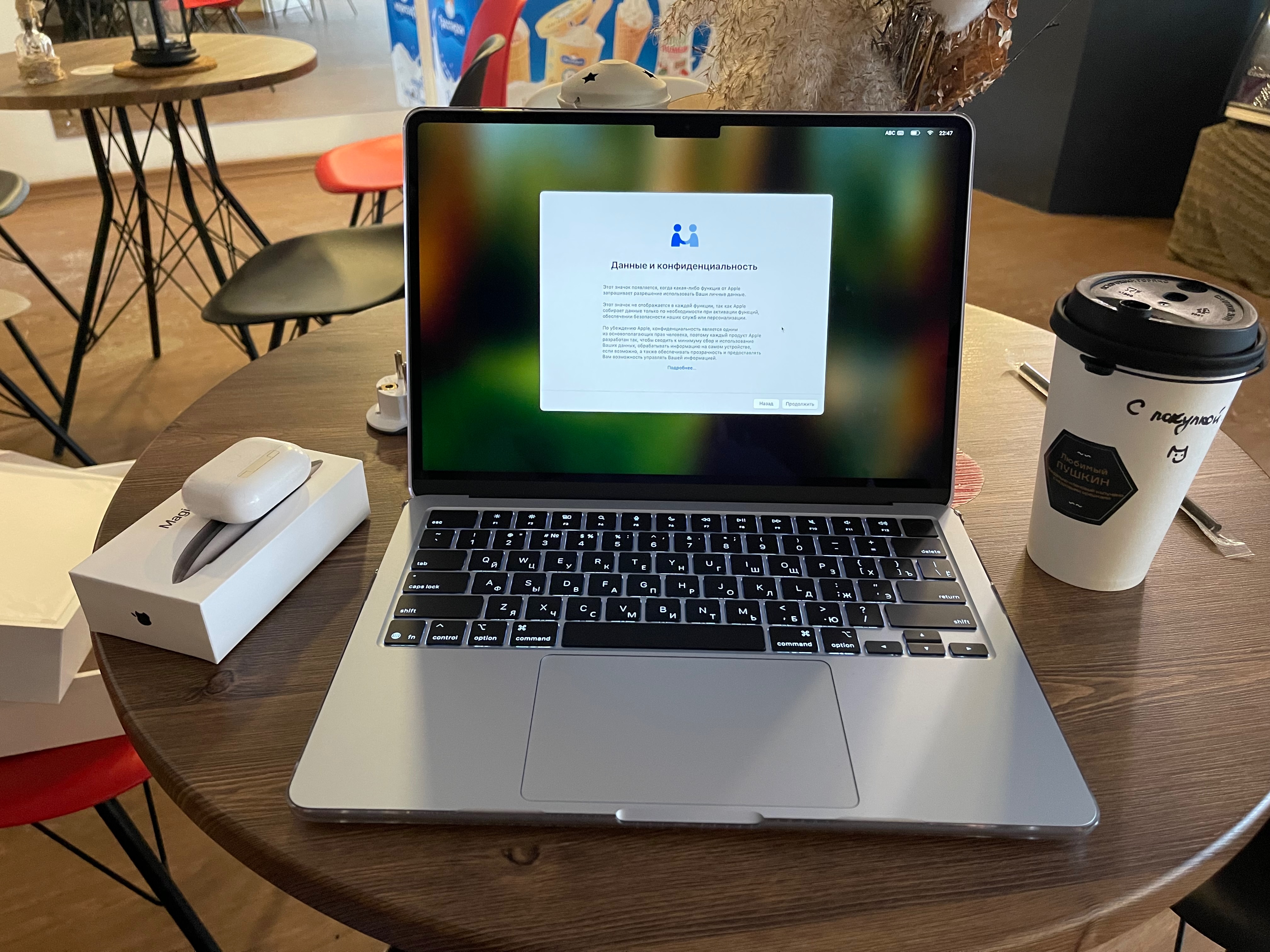
Продавец Mr Apple (индивидуальный предприниматель Чернухин Максим Игоревич). Цена договора 125 900 руб.
Описание модели Apple MacBook Air M4
- Название модели: MacBook Air
- Идентификатор модели: Mac16,12
- Номер модели: MC6T4HN/A
- Чип: Apple M4
- Общее количество ядер: 10 (4 производительности и 6 эффективности)
- Память: 16 ГБ
- Версия системной прошивки: 11881.101.1
- Версия загрузчика ОС: 11881.101.1
- Серийный номер (система): KF...9R
- UUID аппаратного обеспечения: 6E0BE5C2-B083-5B48-9273-B53A41DE00C0
- UDID обеспечения: 00008132-0004098A11C3001C
- Состояние блокировки активации: Включена
MacBook Air является самым популярным ноутбуком в мире не просто так. Вообще-то, по многим причинам. Он обеспечивает до 18 часов автономной работы. Чип M4 открывает совершенно новый уровень производительности для работы и игр. Apple Intelligence встроен, чтобы помочь вам делать что-то без усилий. И теперь он поставляется в потрясающем небесно-голубом цвете. С идеально портативным MacBook Air вы будете готовы взять на себя практически все, что угодно.
Материалы компании Apple
MacBook Air Speed of lightness
Группы в Телеграмм
Дополнительные устройства для ноутбука

Продавец Mr Apple (индивидуальный предприниматель Чернухин Максим Игоревич). Цена договора 15 900 руб.
Мышь Magic Mouse беспроводная и перезаряжаемая, с оптимизированным дизайном ножек, который позволяет ей плавно скользить по вашему столу. Поверхность Multi-Touch позволяет выполнять простые жесты, такие как пролистывание между веб-страницами и прокрутка документов.
Аккумуляторная батарея будет питать вашу волшебную мышь около месяца или более между зарядами. Она готова к работе прямо из коробки и автоматически соединяется с вашим Mac, а также включает в себя тканый кабель USB-C - Lightning, который позволяет соединять и заряжать, подключая его к порту USB-C на вашем Mac.
Он оснащен портом USB-C и включает в себя плетеный зарядный кабель USB-C, который позволяет соединять и заряжать, подключая его к порту USB-C на вашем Mac, чтобы вы могли заряжать все свои любимые устройства с помощью одного кабеля.
Поставщик: ООО "ДНС Ритейл". Цена договора 8 599 руб.

Внешний SSD Kingston SXS1000 [SXS1000/1000G] с внутренним объемом 1000 ГБ обеспечивает высокую производительность и удобство резервного копирования файлов. Он выполнен в корпусе из металла и пластика, что гарантирует стойкость к повреждениям и защищает данные от потери. Размеры 69.5x32.6 мм и вес 28.7 г делают его удобным в использовании. Быстродействие накопителя обеспечивается благодаря скорости до 1050 Мбайт/сек. Для синхронизации с техникой применяется интерфейс USB 3.2 Gen2 Type-C. В комплекте с накопителем Kingston SXS1000 предусмотрен кабель с разъемами USB Type-C и USB Type-A.
Локальное резервное копирование на внешний SSD
Идея покупки внешнего SSD состоит в решении задачи по использованию встроенной в macOS возможности резервного копирования ноутбука с использованием подсистемы Time Machine и расширении доступного дискового пространства для операционной системы ноутбука, использовании многоуровневой системы хранения файлов. Для этого диск SSD разбивается на два тома по 500 гигабайт (KINGSTON и KINGSTON-DATA).
Первый том KINGSTON указываю в качестве хранилища для Time Machine. При этом раздел форматируется с файловой системой APFS с шифрованием и чувствительностью к регистру символов.
Второй том KINGSTON-DATA объемом 500 гигабайт форматирую аналогично, с файловой системой APFS. Это дисковое пространство использую для хранения загруженных дистрибутивов файлов, торрентов и других файлов, скорость работы с которыми не критична.
Настройка резервного копирования с использованием подсистемы Time Machine включает:
- расписание копирования каждый час
- исключение тома KINGSTON (так как на него производится резервное копирование файлов)
Описание Time Machine
Time Machine — это встроенная функция резервного копирования в операционной системе macOS, разработанная Apple. Она позволяет автоматически создавать резервные копии всех файлов, включая системные данные, приложения, настройки и пользовательские документы.
▎🔹 Основные возможности Time Machine:
• Автоматическое резервное копирование – сохраняет изменения каждый час, день и неделю.
• Хранение истории версий – можно восстановить файлы на момент любой сохранённой даты.
• Полное восстановление системы – в случае сбоя macOS можно вернуть весь компьютер в предыдущее состояние.
• Инкрементное копирование – сохраняет только изменённые файлы, экономя место.
• Поддержка внешних накопителей – HDD, SSD, сетевые хранилища (NAS) и даже отдельные разделы диска.
▎🔹 Как работает Time Machine?
1. Первая резервная копия – полное копирование всех данных.
2. Последующие копии – сохраняются только изменения.
3. Управление хранилищем – старые копии автоматически удаляются при нехватке места.
▎🔹 Как настроить Time Machine?
1. Подключите внешний диск (или выберите сетевой).
2. Перейдите в «Системные настройки» → «Time Machine».
3. Нажмите «Выбрать диск» и укажите носитель.
4. Активируйте «Автоматическое резервное копирование».
▎🔹 Как восстановить данные?
• Отдельные файлы: через Finder (вход в Time Machine через значок в меню).
• Полный сброс системы: через macOS Recovery (⌘ + R при загрузке).
▎🔹 Плюсы и минусы
✔ Простота настройки и использование.
✔ Глубокая интеграция с macOS.
✔ Возможность восстановления системы целиком.
✖ Требуется внешний накопитель (или NAS).
✖ Нет облачного резервного копирования (только локальное).
Time Machine — удобное решение для пользователей Mac, которое минимизирует риски потери данных. Однако для максимальной безопасности рекомендуется дублировать важные файлы в облаке (iCloud, Google Drive и др.).
Подключение внешнего SSD к MacBook Air M4
USB 3.2 Gen2 Type-C - это новый форм-фактор для современных устройств типа внешних SSD дисков. Новый MacBook Air с чипом M4, представленный в 2024 году, оснащён двумя портами USB 4 / Thunderbolt 3 (до 40 Гбит/с), как и его предшественник на M2.
▎🔹 Характеристики портов MacBook Air M4 (13" и 15"):
• Тип портов: USB 4 / Thunderbolt 3 (совместимы с USB-C)
• Количество: 2 порта (оба на левой стороне)
• Скорость: до 40 Гбит/с (поддержка Thunderbolt 3 и USB4)
• Функции:
• Подключение до двух внешних дисплеев (6K + 5K в режиме clamshell)
• Зарядка через MagSafe 3 (быстрее, чем через USB-C)
• Совместимость с USB 3.1 Gen 2 (10 Гбит/с) и Thunderbolt 3
• Поддержка DisplayPort, Power Delivery (PD) и режима HDMI через адаптер
▎🔹 Что можно подключить?
✅ Внешние мониторы (до 6K @ 60 Гц)
✅ SSD (NVMe) через Thunderbolt (очень высокая скорость)
✅ Док-станции Thunderbolt
✅ Адаптеры (HDMI, Ethernet, USB-A, SD-карты)
▎🔹 Чего не хватает?
❌ Нет поддержки Thunderbolt 4/5 (но разницы в скорости пока почти нет)
❌ Всего 2 порта (как у M2, но у MacBook Pro M4 уже больше)
❌ Нет слота для SD-карты или HDMI (нужны переходники)
▎🔹 Советы по использованию
• Если нужно больше портов, возьмите док-станцию Thunderbolt (например, от CalDigit или OWC).
• Для максимальной скорости SSD используйте накопители с PCIe 4.0 NVMe (через Thunderbolt).
• Для зарядки удобнее MagSafe, чтобы не занимать USB-C.
Примечания к выпускам операционной системы
29.03.2025 macOS Sequoia 15.4 RC 2 Seed Release Notes
WKWebView
Resolved Issues
-
Fixed: (145318999)
Apple Intelligence
Known Issues
-
After restoring macOS 15.4, some Apple Intelligence features might not be available or you might see "Downloading support…". (145297891)
Workaround: Restarting your device might resolve the issue.
Automatic Assessment Configuration
Resolved Issues
-
Fixed: Assessment session might be interrupted in high-memory use conditions. (144416806)
Driver Extensions
Known Issues
-
After updating to macOS 15.4 beta, you might experience issues with loading installed drivers. (145330084) (FB16547388)
Workaround: Go to System Settings > General > Login Items & Extensions and disable your affected driver extensions. Restart your Mac. After restarting, go back to System Settings > General > Login Items & Extensions and re-enable the affected driver extensions.
FSKit
New Features
-
FSKit is now available, enabling delivery of user space file systems as Application Extensions. These file systems support integration with DiskArbitration. (44900760)
Game Controller
Resolved Issues
-
Fixed: Game controllers might stop responding when accessibility features, such as Voice Over, are enabled. (141497799)
libxml2
Deprecations
-
The custom allocation API for libxml2 is deprecated starting in macOS Sequoia 15.4, iOS 18.4, tvOS 18.4, visionOS 2.4, and tvOS 18.4. If this API is not used, no changes are required. If this API is currently used, make changes to call
malloc()instead ofxmlorMalloc() xml; callMalloc Atomic() realloc()instead ofxml; callRealloc() free()instead ofxmland callFree() strdup()instead ofxml. Stop callingMem Strdup() xmlMemSetup(),xmlMemGet(),xmlandGc Mem Setup() xmlto set custom allocation functions. Do not set global variablesGc Mem Get() xmlMalloc,xmlMallocAtomic,xmlRealloc,xmlandFree xml. Internally, libxml2 and libxslt will now use the system allocator instead of this API, so do not rely on these libraries using the custom allocation API. (138404994)Mem Strdup
Networking
Resolved Issues
-
Fixed: On Ethernet, 169.254.169.254 causes functionality issues on CI build machines due to Local Network Privacy restrictions. (145297894) (FB16541221)
Podcasts
New Features
-
Podcasts Search provides suggestions as you type to help you find what you're looking for. (144169175)
SCSIControllerDriverKit
New Features
-
Four new API's have been introduced:
User,Map Bundled Parallel Task Command And Response Buffers Bundled,Parallel Task Completion UserandProcess Bundled Parallel Tasks User.Complete Bundled Parallel Task These APIs introduce the concepts of bundled I/Os and shared memory, for parallel task command and response buffers.
The shared memory addresses the RPC copy overhead. Bundled I/O enables the exchange of multiple I/Os in a single API call (in both submission and completion path), instead of handing over one I/O at a time between DriverKit and DriverExtension. This helps mitigate the DriverKit latencies while interacting with DriverExtension.
The
IOUserfile explains the concepts of I/O bundling and shared memory for parallel task and response buffers.SCSIParallel Interface Controller .iig If DriverExtension has considerably lower I/O performance compared to the KernelExtension for workloads with high queue depths or very small I/O sizes (i.e. 4KB), try using these new APIs. (134516478)
SD Card Reader
New Features
-
Apple silicon Macs with an internal SD card reader now support SDUC cards larger than 2TB. (122898691)
StoreKit
New Features
-
New StoreKit APIs support Advanced Commerce API in-app purchases. (118528943)
-
By using the new purchase option API
introductory, you can now set a preference for whether an introductory offer should be redeemed during a purchase. This API requires you to sign a payload on your server in order to either apply the offer (even if the customer is not eligible) or block it. (136152740)Offer Eligibility(compact JWS:) -
New properties
app,Transaction ID original, andPlatform periodare now available in AppTransaction , Transaction , Transaction.Offer , and Product.SubscriptionInfo.RenewalInfo . (136395697) -
The
Platformsymbol used by originalPlatform in AppTransaction has been moved toApp. (143632084)Store .Platform -
The introductory offer eligibility preference API in PurchaseOption has been renamed to
introductory. (143905053)Offer Eligibility(compact JWS:) -
watchis removed as an option in the AppStore.Platform API.OS watchis now combined withOS i. (145578780)OS
Resolved Issues
-
Fixed: StoreKit helper application quits with NSCocoaErrorDomain error 4097 during a purchase. (140317005) (FB15907723)
-
Fixed: StoreKit APIs might return errors from the StoreKit 2 domain during a purchase. (144191684)
Known Issues
-
Calling
iswill return false if there is no user account signed in. (146119524)Eligible For Intro Offer(for:) Workaround: The user should sign in with their App Store account to request introductory offer eligibility.
Deprecations
-
Transactionis now deprecated. This API returns the latest transaction that entitles the user to a product, which may not include transactions originated for family shared subscriptions. Use the.current Entitlement(for:) Transactionmethod to get all the transactions that entitle the user to a product. (138320205).current Entitlements(for:)
SwiftUI
New Features
-
On macOS
.sheet,.alertand.confirmationmodal presentations conditionally allow app termination (via the menu item, ⌘Q, Software Update, etc.) automatically. This is now configurable with two new modifiers,Dialog presentationandPrevents App Termination(_:) dialog. (141551605)Prevents App Termination(_:)
Resolved Issues
-
Fixed: A color set by the
tint(_:)modifier does not override the tint color of buttons in that view's confirmation dialogs and alerts. (138774306) -
Fixed: For apps compiled against iOS 18.4 beta, applying
defaultto customizable toolbar items does not hide the item by default on iOS. (139815290)Visibility(.hidden) -
Fixed: When NavigationStack or NavigationSplitView content updates, the environment is not invalidated unless properties in the environment have changed. (139855826)
-
Fixed:
.onmodifier's closure argument is required to bePreference Change @Sendable. This might cause concurrency diagnostics that's unnecessary if the closure needs to access main actor-isolated values. This particular closure shouldn't have to be this restrictive. (145238570)
System Calls
New Features
-
fileport_makeport(2) and fileport_makefd(2) are now APIs with manual pages. (66571768) (FB8270900)
UIWritingToolsCoordinator
Resolved Issues
-
Fixed: In macOS 15.4 beta, NSWritingToolsCoordinatorDelegate method
-writingis marked as optional and will not be called. (142681236)Tools Coordinator: requests Range In Context With Identifier For Point: completion:
URLSession
New Features
-
To enable the new HTTP loading mode, set
usesto false on URLSessionConfiguration. The new loading mode will become the default in a future release. (89390075)Classic Loading Mode
Virtual Machines
Resolved Issues
-
Fixed: M4 Macs are unable to launch virtual machine, and attempts result in a system restart. (145309647) (FB16542958)
Writing Tools
Resolved Issues
-
Fixed: After generating a list, key point, table, or summary in the pop-over, selecting "Replace" results in an error message. (145186545)
01.04.2025 Обновление
Updates Released
Thank you for your participation!
The final versions of these updates are now publicly posted and available through Software Update:
Окончательные версии этих обновлений теперь опубликованы в открытом доступе и доступны через систему обновления программного обеспечения:
- HomePod 18.4 build 22L255
- iOS & iPadOS 18.4 build 22E240
- iOS & iPadOS 17.7.6 build 21H423
- macOS Sequoia 15.4 build 24E248
- macOS Sonoma 14.7.5 build 23H527
- macOS Ventura 13.7.5 build 22H527
- tvOS 18.4 build 22L255
We appreciate your participation. You have helped contribute to the overall quality of our products, and many issues have been addressed as a result of your efforts. We realize that testing may have involved a great deal of time on your part to provide feedback, submit follow-up information, and re-install software along with your daily work. Thank you for your dedication.
Мы ценим ваше участие. Вы внесли свой вклад в общее повышение качества нашей продукции, и благодаря вашим усилиям были решены многие проблемы. Мы понимаем, что тестирование, возможно, отняло у вас много времени, необходимого для предоставления отзывов, дополнительной информации и переустановки программного обеспечения, а также для вашей повседневной работы. Благодарим вас за вашу преданность делу.
Command Line Tools for Xcode
The Command Line Tools enable UNIX-style development via Terminal by installing command line developer tools, as well as macOS SDK frameworks and headers. Many useful tools are included, such as the Apple LLVM compiler, linker, and Make. If you use Xcode, these tools are also embedded within the Xcode IDE.
Инструменты командной строки для Xcode
Инструменты командной строки позволяют разрабатывать в стиле UNIX через терминал, устанавливая инструменты разработчика командной строки, а также платформы и заголовки macOS SDK. В комплект входит множество полезных инструментов, таких как компилятор Apple LLVM, компоновщик и Make. Если вы используете Xcode, эти инструменты также встроены в IDE Xcode.
15.04.2025 macOS Sequoia 15.5 Beta 3 Release Notes
Finder
Resolved Issues
-
Fixed: Network shares containing large amounts of data are incorrectly enumerated. (148408379)
vhf
Resolved Issues
-
Fixed: Availability checking is disabled for C APIs in hvf. (148385341)
Pro Display Calibrator
Resolved Issues
-
Fixed: Customizing display calibration using the Pro Display Calibrator causes a system reboot on 14-inch and 16-inch M4 MacBook Pros. (148038484)
StoreKit
Resolved Issues
-
Fixed: Calling
iswill return false if there is no user account signed in. (146119524)Eligible For Intro Offer(for:)
29.04.2025 macOS Sequoia 15.5 Beta 4 Release Notes
Finder
Resolved Issues
-
Fixed: Network shares containing large amounts of data are incorrectly enumerated. (148408379)
hvf
Resolved Issues
-
Fixed: Availability checking is disabled for C APIs in hvf. (148385341)
Pro Display Calibrator
Resolved Issues
-
Fixed: Customizing display calibration using the Pro Display Calibrator causes a system reboot on 14-inch and 16-inch M4 MacBook Pros. (148038484)
Service Management
Resolved Issues
-
Fixed an issue preventing apps from registering helper executables on macOS. (147420361) (FB16933413)
StoreKit
Resolved Issues
-
Fixed: Calling
iswill return false if there is no user account signed in. (146119524)Eligible For Intro Offer(for:)
07.05.2025 macOS Sequoia 15.5 RC Release Notes
Finder
Resolved Issues
-
Fixed: Network shares containing large amounts of data are incorrectly enumerated. (148408379)
hvf
Resolved Issues
-
Fixed: Availability checking is disabled for C APIs in hvf. (148385341)
Pro Display Calibrator
Resolved Issues
-
Fixed: Customizing display calibration using the Pro Display Calibrator causes a system reboot on 14-inch and 16-inch M4 MacBook Pros. (148038484)
Service Management
Resolved Issues
-
Fixed an issue preventing apps from registering helper executables on macOS. (147420361) (FB16933413)
StoreKit
Resolved Issues
-
Fixed: Calling
iswill return false if there is no user account signed in. (146119524)Eligible For Intro Offer(for:)